World · Fox 91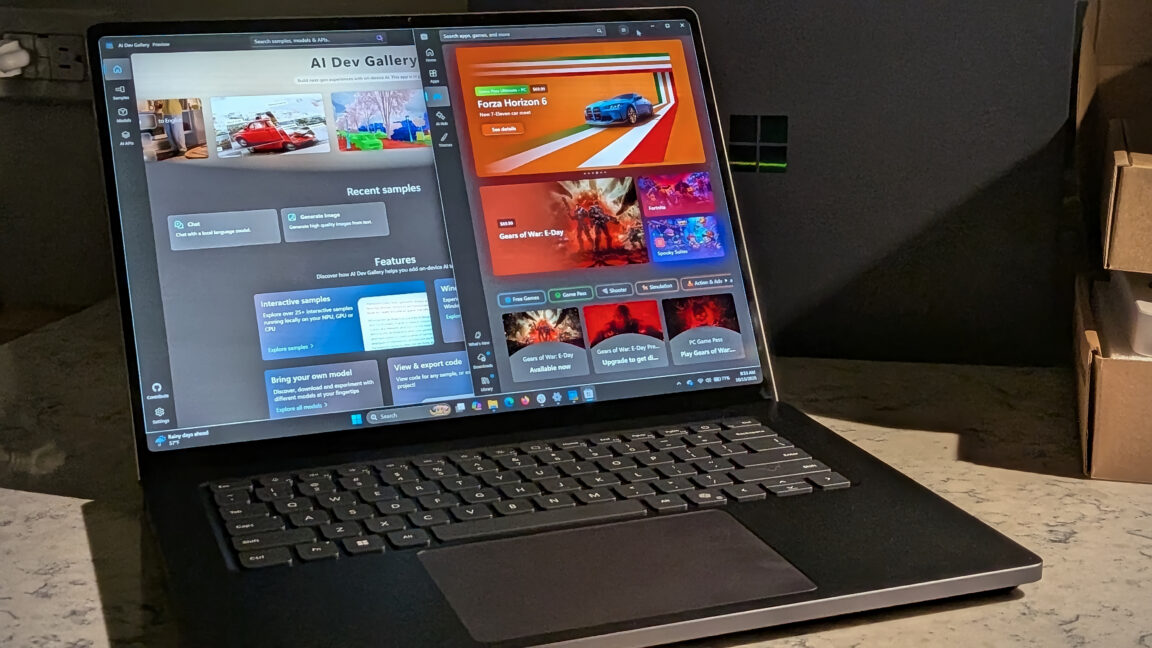
Skip to content Almost there Microsoft promises one machine for dev, AI, and gaming, and mostly gets there. Over the past week, the laptop Microsoft sent me has been summarizing books and movies, generating images from my imagination, and running a 70-billion-parameter AI model that would be a stretch to fit on most laptops. It also played AAA games at a speed and fidelity I would have thought impossible on an ARM system just a year ago.
Microsoft wants to sell you one computer for all of your needs, and for once that doesn’t feel like total marketing fluff. Mostly. Microsoft is throwing both arms around the new Nvidia RTX Spark platform with the Surface Laptop Ultra—and setting its sights on the would-be MacBook Pro buyer, or as the company called it, “a high performance audience.” The bet is that rather than a gaming desktop for fun and a development laptop for work, buyers will pay more for one machine that does both.
The Surface Laptop Ultra arrives at a strange time in personal computing. Recent industry numbers showed a 20 percent drop in total PC shipments year over year in the third quarter of 2026. That’s not just consumer purchasing either—that’s across the board.
Between the RAMpocalypse that has exploded consumer prices and an industry fixated on enterprise money, there hasn’t been much new hardware to excite PC enthusiasts. Microsoft isn’t the only one debuting an RTX-chipped laptop. Dell’s XPS 16 Creator Edition and Asus’s ProArt series (our own Ryan Whitwam ‘s review should be appearing on the front page soon) are betting on the chipset as well.
The question when reviewing the Surface Laptop Ultra isn’t whether it can achieve the things that it claims competently, but whether there’s finally a compelling reason for power users to switch to an ARM system, and whether their daily workloads can still be achieved without hiccups when compared to a more traditional x86 offering, or the biggest competitor within the segment, the MacBook Pro. With a starting price of $2,599, this is not a budget alternative to Apple silicon. This is bleeding-edge hardware, and you’re going to be paying a premium for it.
Depending on your selected processor and memory options, MSRP can reach as high as $5,899 . Prospective buyers should note that the lower-specced 24GB unified memory model ships with Windows 11 Home, while the rest of the fleet arrives with Windows 11 Pro. I received the 64GB model for testing, and I think that would probably be the sweet spot for a lot of users to align cost and performance.
I really have to wonder if 24GB is enough to go around when we know that Windows 11 is memory-hungry on its own. When you have to assign a significant portion of that 24GB of unified memory to VRAM for gaming, does performance suffer? An audience question inside the Surface Laptop Ultra review information session asked about the usefulness of the base model, and didn’t get much back other than a vague “useful for smaller models locally” answer.
Microsoft may have a more definitive answer to that question a few months from now when software and drivers catch up with hardware. So has the Microsoft and Nvidia team-up created the ultimate all-in-one laptop? Or is this the industry once again putting the hardware hype cart before the finished-software horse?
Surface Laptop Ultra specs Specs at a glance: Surface Laptop Ultra Base config As reviewed Screen 3:2, 15-inch mini-LED touchscreen; 3270×2180 (262 PPI) up to 120 Hz dynamic 3:2, 15-inch mini-LED touchscreen; 3270×2180 (262 PPI) up to 120 Hz dynamic OS Windows 11 Home Windows 11 Pro CPU NVIDIA RTX Spark N1X (5120-core GPU, 18-core CPU) NVIDIA RTX Spark N1X (6144-core GPU, 20-core CPU) (4.00 GHz) RAM 24GB LPDDR5x unified memory 64GB LPDDR5x unified memory GPU Blackwell RTX GPU Blackwell RTX GPU Storage 512GB SSD 1TB SSD Networking Wi-Fi 7, Bluetooth Core 5.4 Wi-Fi 7, Bluetooth Core 5.4 Ports 2 x USB-C/USB4, 1 x USB-C/USB4 w/ Mag Connect, 1 x USB-A 3.1, 1 x HDMI 2.1b, SD Card Reader, 3.5mm Headphone Jack 2 x USB-C/USB4, 1 x USB-C/USB4 w/ Mag Connect, 1 x USB-A 3.1, 1 x HDMI 2.1b, SD Card Reader, 3.5mm Headphone Jack Size 12.95×9.40×0.71 inches 12.95×9.40×0.71 inches Weight 4.41 lbs (2.0 kg) 4.41 lbs (2.0 kg) MSRP $2,599.99 $4,299.99 Additional features 1080p front-facing webcam 1080p front-facing webcam Tidy internals of the Surface Laptop Ultra. Microsoft promises the laptop is “built with serviceability in mind.” Tidy internals of the Surface Laptop Ultra. Microsoft promises the laptop is “built with serviceability in mind.” Display The 15-inch mini-LED display might not be enough to get folks to run to the Ultra on its own, but it’s a compelling reason to add it to the list.
The 3270×2180 native resolution looks simply stunning whether you’re watching a 4K video, playing games, or just staring at a desktop spreadsheet. I preferred the Enhanced color profile, but Vivid and sRGB modes looked fantastic as well. Not the easiest to photograph, but the screen is stunning in person.
Not the easiest to photograph, but the screen is stunning in person. Blacks stayed deep against bright, vivid subjects without any sort of visible blooming. I wish I could say the same for my TV.
While I can’t quantify how it stacks side by side with the latest MacBook Pro Retina display, I can say that this is a damn nice screen. Viewing angles are superb, colors are punchy, and the 2,000-nit peak brightness kept things legible even in a room flooded with natural sunlight. My only gripe is that in bright rooms, there is glare to contend with.
The glossy glass looks fantastic at lower light levels but can act a bit mirror-like in direct sunlight. It hindered my ability to photograph the screen more than it did my ability to use the computer. Still, if you’re looking for a matte-screen laptop, you might want to keep that in mind.
Big Buck Bunny in 4k looks incredible on this screen. Big Buck Bunny in 4k looks incredible on this screen. Keyboard and trackpad The keyboard on the Surface Laptop Ultra is exactly what you’d expect on a premium machine like this.
It’s excellent, if unremarkable. The keys have a shallow but satisfying press, the spacing makes sense for my hands, and the whole package delivers a very comfortable typing experience. I don’t have a whole bunch of laptops lying around to compare it to, but unsurprisingly, the closest would be my 2020 MacBook Pro.
Microsoft knows what market it’s going after here, and I don’t mind them lifting direct inspiration from Apple in this department. Both the keyboard and the trackpad are excellent. Both the keyboard and the trackpad are excellent.
The trackpad is similarly competent. It’s absolutely huge, measuring 5.5 inches long by 3.5 inches tall, with excellent tracking accuracy throughout my testing time. Normally, one of the first things I do when plugging in a laptop to work from is to attach an external mouse, but over days of testing, I never reached for the mouse drawer.
Microsoft made a point to emphasize the trackpad’s haptic feedback capabilities in native programs during the review information session. I’m not sure if there are still updates left to come that I haven’t received yet, but I can’t recall a time when I noticed additional mouse haptics had kicked in when I opened MS Office or anything. As it stands, the trackpad isn’t groundbreaking, but it is premium enough to be part of an “ultra” laptop.
Magnetic USB-C charging Microsoft describes the included magnetic charging connection and port as being “the world’s first built-in magnetic USB-C charging experience.” It’s difficult to get upset about the marketing department doing their jobs, but this claim struck me as more of a technical truth than engineering feat. Apple’s MagSafe charging debuted on the original MacBook Pro all the way back in 2006 . The concept of a breakaway magnetic charger isn’t anything new, but technically Microsoft’s assertion holds water in that it is the first USB-C connector on a laptop with a matching magnetic port, rather than a proprietary connector.
The charging brick and magnetic cable. The charging brick and magnetic cable. Marketing claims aside, the magnetic connection does work well.
The port and charger naturally guide themselves together, as magnets do, and made plugging the laptop in to charge in a dark room hassle-free. Normally I’d be holding the cord in one hand while trying to fumble around in the dark for the phone in my pocket and remember the gesture to quickly turn on the flashlight. Now I just have to get the cable within the vicinity, and the magnets do the rest.
Perfect for when all I want to do is plug the PC in and go to bed. The magnetic charging port exposed. The magnetic charging port exposed.
What’s perhaps the larger selling point for magnetic charging is the cable’s ability to break away if yanked from the PC. Nothing will ruin your day faster than watching a new laptop fly off the counter. With the breakaway cable, you’re getting peace of mind that your laptop shouldn’t meet the floor should a startled cat or curious toddler come into contact with the cable.
I’ve never had it happen with one of my laptops, but that doesn’t mean accidents don’t occur. I simulated a few ‘accidental disconnects’ with modest force, and the cable disconnected dutifully as it should. The new USB-C magnetic charger and port.
The new USB-C magnetic charger and port. While I won’t say that it’s a must-have, it’s certainly a nice-to-have. And in this package it’s certainly the type of premium accessory you’d expect, but it’s not going to move units on its own—not at these price tiers.
Geekbench Geekbench 7 Pro. Geekbench 7 Pro. According to Nvidia, the RTX Spark N1X is a Grace CPU fused to a Blackwell GPU.
Unlike chipsets like AMD’s Ryzen AI and Intel’s Core Ultra series, the N1X has no dedicated NPU—instead it leans on unified memory and the heavy-duty Blackwell GPU for AI work. Traditionally, Copilot+ certification has hinged on a 40+ TOPS NPU, but Microsoft is extending the label to this machine’s GPU-based AI performance anyway (more on that later). The graphics bench tests sing when given access to 40GB+ of usable RAM.
These results certainly back up Microsoft’s claims that the Surface Laptop Ultra can handle modern AAA gaming. It just takes some different paths to performance than we might be used to. The AI benchmark was a bit of a miss.
I don’t have the ability to run an NPU-accelerated benchmark in Geekbench AI, because the software presumably doesn’t currently have a compatible NPU backend for this unique architecture. Curiously, Windows does list a generic NPU under Display Adapters in Device Manager , but Geekbench AI only offered the ONNX CPU testing path. It’s unclear whether the generic NPU listed by Windows is a virtual device, some sort of driver exposure, or something else entirely.
CPU was the only available backend in Geekbench AI for now. CPU was the only available backend in Geekbench AI for now. It isn’t possible to get performance metrics on hardware that Geekbench can’t properly see yet.
It’s still early days, but it’s the kind of software/hardware incompatibility that you hate to run into when just trying to check out what your new computer can do. The CPU score in Geekbench AI isn’t particularly impressive, and bypassing the Blackwell sort of defeats the purpose of this hardware, so I hope that as the RTX Spark devices start getting out there, we’ll be able to get a better idea of the full potential. AI testing (where possible) with AI Dev Gallery Microsoft recommended reviewers try its new AI Dev Gallery app (preview) as a way to test on-device AI.
The software is currently in public preview, and users can pull models of their choice directly from Hugging Face for testing or workflow. The project’s GitHub carries a helpful word of warning about running models on ARM64-based Copilot+ PCs, which, according to Microsoft, this is. Or will be, eventually.
Confusing, isn’t it? The new AI Dev Gallery app preview. The new AI Dev Gallery app preview. ⚠️ Note : On ARM64-based Copilot+ PCs, make sure to build and run the solution as ARM64 (and not as x64 ).
This is required, especially when running the samples that communicate with models such as Phi Silica. On paper, AI Dev Gallery should have been a simple one-stop shop to test a barrage of different models against the Surface Laptop Ultra’s new RTX Spark setup. In practice, all of the available conversational Phi and Mistral models in the app are CPU-only—no GPU or NPU pathways available, despite the Blackwell sitting there idling.
GPU and NPU paths are available for some image generation and embedded model options, but it again leaves me with that lingering feeling that we’re pushing cutting edge hardware just to have something to offer the market. Oh, and it’s worth noting that twice during my testing, I was browsing AI Dev Gallery’s model selection when the program abruptly froze and then crashed entirely back to desktop. There are still rough edges to smooth out.
Phi Silica, Microsoft’s flagship on-device LLM and a major piece of the Copilot+ stack, cannot be accessed out of the gate. Accessing the API requires a developer registration with an associated app identity. These may seem like obvious steps for those already in the AI-know, but curious consumers might get frustrated by reaching a gate in what is advertised as a ready-to-run experience out of the box.
AI Dev Gallery conversational model ( Mistral 7B Instruct 0.2 CPU) — Cutting out the GPU, this CPU-only model was still able to manage about 11 tokens/sec. Slower than a GPU path for sure, but it’s interesting that the CPU alone can manage smaller models at a reasonable conversation rate. Chatting with Mistral.
Chatting with Mistral. AI Dev Gallery image generation ( Stable Diffusion v1.4 ) — I attempted image generation harnessing the CPU by accident at first. That didn’t fare so well, but as soon as I switched over to the NvTensorRT (GPU) option, I was able to generate images from a prompt in about three to four seconds by my stopwatch.
The results aren’t the best you’ve ever seen, but with additional prompting and image coaxing, I’m confident that they could have been improved. Whether you need local AI image generation on your daily driver is another matter. Make sure you’re powering your model correctly!
Make sure you’re powering your model correctly! I attempted to follow Microsoft’s instructions listed in the AI Dev Gallery to run a CUDA-accelerated Phi model, but the process failed. After resolving some command-line issues, pip downloaded the correct Python 3.13 package of onnxruntime-genai-cuda for Windows ARM64, but then failed because the required onnxruntime-gpu dependency doesn’t seem to have a compatible distribution for this environment.
Logs indicated the CUDA install path wasn’t usable on this setup at this time. Whether this is a limitation of the current package, an ARM64 packaging gap, or human error, I can’t be totally sure. It was just frustrating to feel so limited in the space where Microsoft told me to play.
Windows AI Dev Gallery app. Windows AI Dev Gallery app. I attempt to prompt my way into a picture of my dog.
Ollama Time to try something big... Time to try something big... Frustrated with the current state of Microsoft’s AI Dev Gallery app, I decided to try some testing via Ollama running locally in the command prompt.
I downloaded the Llama3.3-70b model . That’s a 43GB model—10 times the size of the Mistral model we ran on the CPU in AI Dev Gallery, with 10 times the parameters (70 billion over 7). If I were Microsoft, this is the type of demo I’d want to be showing off.
This massive 70B model would be unlikely to run on any discrete laptop GPU, but the Blackwell still managed 6.26 tokens/sec. The fact that it ran at all is impressive, though I will say this was one of the few times when the Blackwell really seemed to be sweating. System fans were spinning at 100 percent while those Wayne’s World synopses were being written.
Credit where due, even at full tilt, the fans don’t generate a lot of sound other than the high-speed pushing of air. Test Model Execution Provider Speed Memory Mistral-7B (AI Dev Gallery) Mistral 7B Instruct 0.2 CPU only 11 tokens/sec N/A Llama-3.3-70B (Ollama) llama3.3:70b GPU only 6.26 tokens/sec 43 GB Using a huge model to help remember the plot of Wayne’s World . Using a huge model to help remember the plot of Wayne’s World .
Gaming When Microsoft speaks of a high performance audience, none is more demanding than the modern high-end PC gamer. I’m old enough that I still find 1080p/60 Hz gaming to look great, and that’s probably for the best, given the current cost of video cards, but those who crave the zero input lag, 4K, ray-traced life are a particular bunch. Whether the package on offer with the Surface Laptop Ultra will be high performance enough for that audience will be up to the individual gamer and their wallet, but this gamer was certainly impressed that these results were coming out of an ARM machine.
Microsoft claims 85 percent of its Game Pass library is currently playable on ARM, but I had difficulty trying to find if any titles have a native ARM port, or if they were running in x64 through the Prism lens of emulation. Windows Performance Fit offers a glimpse into how the game might perform on your system, but nothing more. Either way, if it’s the playing of games that you’re concerned with, there shouldn’t be much this system won’t run.
The full Nvidia DLSS feature set seems to be available, and ray tracing boxes can be clicked in graphics options. Factor in an HDR-capable display, and the Surface Laptop Ultra is covering a lot of the must-haves for modern gamers. After an initial boot of Gears of War: E-Day that saw a solid 4–5 minutes of shader compiling, I was concerned that this might be an every-time occurrence, but subsequent loads were much faster.
This is a game that contains anti-cheat, the latest Unreal Engine, and all the imaginable graphical bells and whistles you’d want from one of your company’s prized franchises. It’s here and running quite well on the Surface Laptop Ultra. While benchmarking, I noticed the system had reported an astonishing 46.7GiB of its 64GiB of unified memory as available VRAM for the game.
Check out that VRAM allocation. Check out that VRAM allocation. To their credit, Microsoft has included a warning for consumers who might not be familiar with the new Surface Laptop Ultra architecture: “App compatibility: Surface Laptop Ultra runs Windows 11 on an Arm-based Nvidia RTX Spark platform.
Many popular apps run natively on Arm. Apps that are not built for Arm can run through Prism, Windows’ built-in emulator. If you rely on specialized hardware drivers, plug-ins, or older utilities, check app and driver compatibility before purchase.” Easy Anti-Cheat and Gears of War: E-Day loading on the Surface Laptop Ultra.
Easy Anti-Cheat and Gears of War: E-Day loading on the Surface Laptop Ultra. Multiplayer titles with kernel-level anti-cheat measures may fail or show warnings under Prism emulation due to signature mismatches in system files. Each time I ran Gears of War: E-Day , I was greeted with a warning message when exiting back into Windows.
It appears as though the Easy Anti-Cheat was flagging the .NET cache as “modified,” though I couldn’t establish whether Prism’s translation was directly responsible. Untrusted Easy Anti-Cheat files? Untrusted Easy Anti-Cheat files?
Additional benchmark results in Forza Horizon 6 . HandBrake Beyond gaming, I wanted to see how video encoding would fare on the new hardware. I ran a real-world encode test via HandBrake on the 2160p 60 fps version of the famous Big Buck Bunny .
The system processed the 10-minute video clip in 2:27 at 180 fps using x264 encoding via the CPU. That’s the snag. Nvidia NVENC or Nvidia HEVC encoding options are nowhere to be found, meaning the Blackwell’s encode engine still isn’t being exposed to the software.
That’s not a problem with HandBrake, it’s just the continuation of a familiar pattern. Hardware decode worked just fine via Media Foundation, so it’s specifically the encode side of things running into a roadblock. Nvidia encoding options are missing for now.
Nvidia encoding options are missing for now. Copilot+ According to Microsoft in the review information session I attended, the Surface Laptop Ultra will be certified as a Copilot+ device, but “full software support won’t arrive until late 2026 or early 2027.” The keyboard’s dedicated Copilot button launches the window for M365 Copilot right now, which is fine if you intended to use it for Cloud AI services, but users may be confused at first given the package they were sold. The Copilot key currently launches the M365 Copilot assistant, not Copilot+.
The Copilot key currently launches the M365 Copilot assistant, not Copilot+. Features like Recall, Click to Do, and the new Windows search bar won’t be available until Microsoft finishes baking them for the Surface Laptop Ultra’s hardware. Participants in the Windows Insider Program will likely see early access before the general public, so if you’re itching for those Copilot+ features, you’ll have to agree to participate and share device information with Microsoft.
Your call. No Copilot+ yet... No Copilot+ yet...
Unscientific battery testing Since the Surface Laptop Ultra is meant to be an all-day device that can handle your workload during the day and your gaming at night, there’s an unavoidable question of how much of that you can actually do on the go. With this in mind, I attempted to measure battery levels every 30 minutes throughout my testing and mapped it to a partial day of mixed use. Time Elapsed Battery Activity 30 minutes 93% CPU Benchmark, web browsing 1 hour 87% Mixed writing, browsing 90 minutes 85% Idle period 2 hours 80% AI testing 2.5 hours 78% Mixed use 3 hours 66% GPU-heavy AI workloads The Surface retained 66 percent of battery life after three hours of varied use.
AI-heavy application use will have you running for the magnetic plug, though. That final 30-minute sample was when I ran the llama3.3:70b model twice, and there was a significant drop-off during that period that would likely remain constant so long as you were pushing the GPU. Sound Speakers on the Surface Laptop Ultra are impressive for such a slim device.
I unwittingly found myself sitting at my desk bobbing my head along to the Forza Horizon 6 theme music while benchmarks were running. To no real surprise given the size constraints, it’s the low-end frequencies that seem most absent in the overall sound, but that’s not to say there’s anything hollow about the final mix. The package is quite serviceable given that most people are going to be using headphones with the device in an office setting or on the go.
I didn’t do any dB measuring, but cranking the volume in my basement was loud enough to get my wife to ask what the heck I was doing from the floor above. Normally it takes reference speakers for that reaction, so I’ll call them sufficiently loud. At no point did I encounter any type of crackles or pops when adjusting volume on the fly, which is always a nice sign that everything is shielded as it should be.
The Forza Horizon series has some really catchy theme music. The Forza Horizon series has some really catchy theme music. Closing thoughts The Surface Laptop Ultra is a very capable machine, perhaps even more capable in places than I had assumed.
Through clever resource allocations via unified memory and the new RTX Spark SoC, Microsoft has genuinely delivered on the hardware side of its “one device for everything” pitch. When a 70 billion-parameter model can run on this laptop with GPU acceleration and not others, that’s impressive. The Surface Laptop Ultra delivers on the gaming portion of its promises, too: AAA titles running on an ARM machine, complete with the latest bells and whistles, and displayed on one of the nicest laptop displays I’ve ever seen.
From the screen to the keyboard to the trackpad, everything feels premium, because it is. The problem isn’t the laptop’s hardware, but everything currently sitting on top of it. Microsoft’s own AI Dev Gallery still feels half-baked, with a limited selection of small models mostly tied to the CPU.
Phi Silica, the flagship LLM, is still gated behind developer registration. The Copilot+ features are still to come at a later date, which might be this year or next. None of these are fatal flaws on their own; this thing is still prelaunch at the time of writing after all.
But taken as a whole, you start to see a pattern. PCs are being rushed to market with the new RTX Spark chipset so that manufacturers at least have something new to offer for the 2026 holiday season, with software left to play catch-up later on some non-specific date. So who is the Surface Laptop Ultra really for?
If you’re a CUDA developer who favors portability and needs to test local AI models on the fly, and you happen to have an extra $2,599–$5,899 in your back pocket, this is genuinely exciting hardware. For everyone else? I’d advise patience.
Take a pause to see how the software matures before jumping ship from your MacBook Pro. The Ultra’s box and contents. The Ultra’s box and contents.
There’s also an element of PC philosophy to consider. I’m the type of person who enjoys purpose-built systems for specific tasks. A desktop rig for gaming, a mini-PC for office work, a laptop or Chromebook for cloud applications on the road.
It’s just how I’ve become wired. “This is my PC for that,” as it were. Though with PC prices likely to stay inflated for at least another few years, maybe Microsoft and Nvidia have delivered a middle ground.
If you’re the type of person who really does want everything in one package, then the Surface Laptop Ultra’s multiple personalities may actually suit you. But the math is still somewhat complicated. You’re paying a premium for bleeding-edge tech where not all features are available yet, and having to do so under the umbrella of Microsoft services, with all the live logins and subscriptions that come with it.
The good, the bad, and the ugly The good: One of the nicest laptop displays you’re likely to see Premium hardware and design Gaming runs shockingly well on ARM Serious CUDA compute performance on a laptop Magnetic USB-C charging is a nice touch Unified memory The bad: Copilot+ features are still several months away AI Dev Gallery’s Preview is still light on features to take advantage of this hardware Expensive silicon shipping without full driver support The ugly: Software support just isn’t there quite yet Has Microsoft and Nvidia’s partnership delivered the ultimate all-in-one PC? Not yet, but they have delivered the first ARM laptop I’ve used that makes the question worth asking—now the horse just needs to show up. Nick Indge is a Senior Technology Reporter at Ars Technica covering hardware, embedded systems, and self-hosted infrastructure.
A former security investigator turned tech writer, he writes to help readers escape subscription traps and regain ownership of their digital lives. He lives in Chicagoland with his family and a goofball husky. 13 Comments
Source: Ars Technica